In the previous tutorial, we mentioned the useful BITx definitions in the device-specific header file. These were at one time variation specific (eg. msp430x2x01 as opposed to msp430g2001), but with the most recent version of Code Composer Studio, TI appears to be moving to device specific header files. Whenever you write software for your MSP device, be sure to include the appropriate header file. For this tutorial, if you're not using a LaunchPad or the G2211, change the header file to whatever device you're using.
So the start of any MSP430 program will have a line similar to this:
#include <msp430g2211.h>
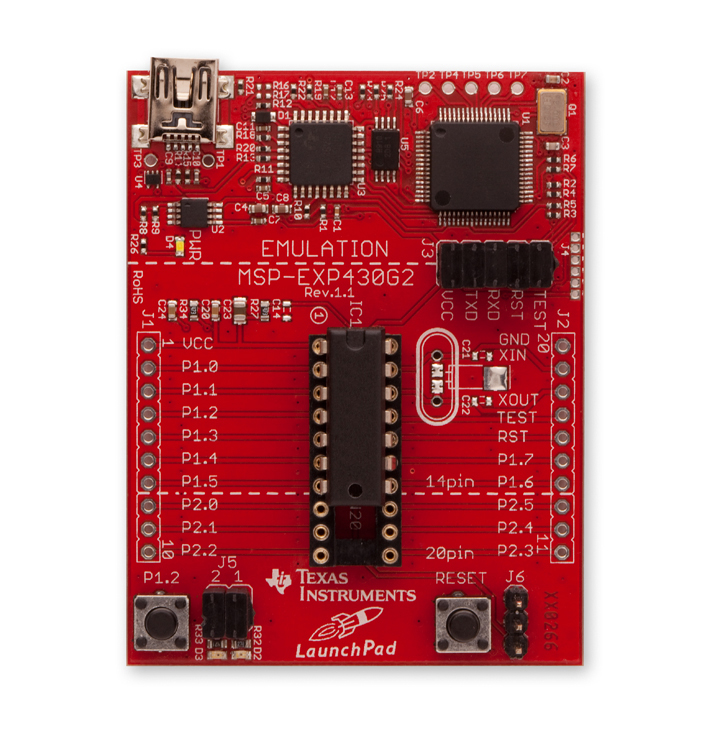
For simple programs, this is often all that is needed before coding the main function, and that is certainly the case for the "Hello, world!" program of microcontrollers, blinky. Blinky is a simple program that toggles an LED at a given period. It's best to use timers, interrupts, and such to do this type of function, but you'll have to wait until we look at those types of peripherals and functions before we can do that. The simplest way to get the program to work is with some type of delay loop. The LaunchPad has a green LED connected to P1.0 and a red LED connected to P1.6. We'll use the green LED for now. Let's get started!
The beginning of our code looks like this:
#include <msp430g2211.h>
void main(void) {
} // main
Unfortunately, we do need one step that we can't explain completely yet before we do anything else. The MSP430 includes a special timer called the Watchdog Timer (WDT). Its function is to reset the CPU if it gets stuck (ie. the watchdog timer runs out). This timer is on by default when the chip powers up. Though we could use this timer to give us our delay, for now we don't want our program to reset on us, so we need to first turn this timer off. (We'll look at using the WDT later.)
The WDT has a 16 bit register called WDTCTL, but only the first 8 bits have any control. The upper byte is used as a security measure; to prevent your code from accidentally changing the WDT, you must provide a password. The password turns out to be 0x5a (in the upper byte, so actually 0x5a00), but the header file helps you out by defining that value as the much easier to remember WDTPW. Add this value to the 1-byte configuration value you want to assign to WDTCTL. To turn off the WDT, we can use the header-defined value WDTHOLD:
WDTCTL = WDTPW + WDTHOLD;
You'll get into the habit of starting all of your first programs with this line, but keep in mind the WDT has a lot of useful functions. We'll discuss those when we talk about the WDT in depth.
Ok, now that we've disabled the watchdog, we can continue writing the code. We want to light an LED on P1.0, so we can use the last tutorial to set that up:
P1OUT = 0;
P1DIR = BIT0;
Now we want to toggle the LED and delay for some given amount of time. I'm using a for loop, though a while or do-while loop would be just as effective. We'll need a counter for the loop, so remember to define it at the start of the code:
#include <msp430g2211.h>
void main(void) {
unsigned int count;
WDTCTL = WDTPW + WDTHOLD;
P1OUT = 0;
P1DIR = BIT0;
P1OUT |= BIT0;
for (count = 0; count < 60000; count++);
P1OUT &= ~BIT0;
for (count = 0; count < 60000; count++);
} // main
What happens when we get to the end of the code? In a computer, it would just exit. In a microcontroller, however, it would just move on to the next address to read its next "instruction". There could be just about anything in there, from random noise to leftover code from older (larger) programs. In any case, it would just continue stepping merrily through the address space until it gets to the end and then... well, I don't know what happens. It's not what is intended to happen in any case, so we need to prevent the processor from ever moving beyond the actual code. We'll do this now by putting the code into an infinite loop. That's usually a bad idea in computer code, but essential here.
#include <msp430g2211.h>
void main(void) {
unsigned int count;
WDTCTL = WDTPW + WDTHOLD;
P1OUT = 0;
P1DIR = BIT0;
P1OUT = 0;
P1DIR = BIT0;
for (;;) {
P1OUT |= BIT0;
for (count = 0; count < 60000; count++);
P1OUT &= ~BIT0;
for (count = 0; count < 60000; count++);
}
} // main
Again, you could easily do the same thing with a while(1) loop or something similar instead.
So there's blinky. The light turns on, it waits, turns off the light, waits again, then goes back to the beginning to do it all over ad nauseum.
Note there's a cleaner way to accomplish this task:
#include <msp430g2211.h>
void main(void) {
unsigned int count; // loop counter
WDTCTL = WDTPW + WDTHOLD; // disable watchdog
P1OUT = 0; // initialize LED off
P1DIR = BIT0; // P1.0 output
P1OUT = 0; // initialize LED off
P1DIR = BIT0; // P1.0 output
for (;;) {
P1OUT ^= BIT0; // toggle LED on P1.0
for (count = 0; count < 60000; count++); //delay
}
} // main
Now you only have to change one loop length to adjust the frequency of the blink. (Though if you want to play with different duty cycles, the first method works well.) I've also added some comments to the code. Programming teachers seem to always stress the importance of good commenting habits; it'll save your hairline in microcontrollers. Comments don't add to the code size at all, so be sure to document everything you do well.
Next time we'll put this into our G2211 and learn how to use CCS to load programs onto the LaunchPad.
Reader Exercise: Write a program like blinky that alternates the green and red LEDs on the LaunchPad (the red LED is on P1.6). Then modify the program so that it alternates flashing the green LED, then the red LED, with short pulses and a delay between the individual flashes.
Disclaimer: I don't have my LaunchPad yet, so I haven't technically tested this code. After doing similar programs for three or four other MSP430's, I'm confident it works, but until I can get a video posted of my LaunchPad blinking its LED with this code, I reserve the right to have made mistakes. =)
Disclaimer 2: When I first typed up this post, I declared the count variable as just int count;. In the MSP430 compiler, a 16-bit plain int cannot count up as high as 60,000; it reaches its highest value then wraps around to a negative value. Using a plain int for this code will never leave the delay loop. An unsigned int, rather, is non-negative. Using an unsigned int allows us to count up higher. Longer delays may require an unsigned long. An alternative would be to use a hex notation; 0xFFFF is the highest value an int can count to. In plain int decimal, this corresponds to 32,767. In unsigned int decimal, it's 65,535.
Disclaimer 2: When I first typed up this post, I declared the count variable as just int count;. In the MSP430 compiler, a 16-bit plain int cannot count up as high as 60,000; it reaches its highest value then wraps around to a negative value. Using a plain int for this code will never leave the delay loop. An unsigned int, rather, is non-negative. Using an unsigned int allows us to count up higher. Longer delays may require an unsigned long. An alternative would be to use a hex notation; 0xFFFF is the highest value an int can count to. In plain int decimal, this corresponds to 32,767. In unsigned int decimal, it's 65,535.